

SeedQR Tool
Copy a SeedQR by hand, then check it
Walks a SeedQR across the screen in small blocks so it can be punched or stamped onto metal without losing your place, then scans the copy you made and confirms it decodes back to the seed you started with.
Last updated Sep 2026
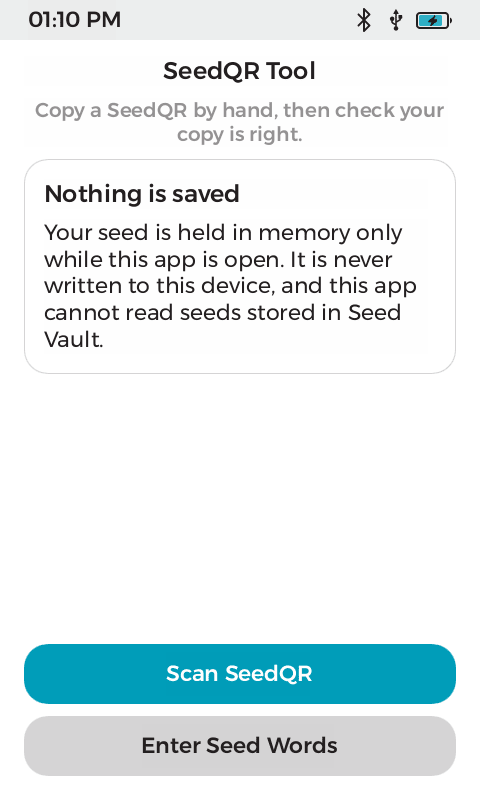
Load a seed by scan or by typing
Overview
A SeedQR encodes a BIP39 seed as a QR code, which makes it compact enough to punch into a metal plate. Copying one by hand is the hard part: a Standard 24 word code is 29 by 29, and losing your place halfway through a grid of 841 squares is easy. This app loads a seed by scan or by typing, re-encodes it in the format you choose, and then walks the code in 7 by 7 blocks. Each screen names the row and column range it covers and shows a mini-map with the active block outlined, so there is always an answer to the question of where you are.
It closes the loop at the end. Scan the copy you made and it is compared against the seed loaded at the start, then reported as a match, a different seed, or not a SeedQR at all. Because the app re-encodes from the seed rather than from the image, you can scan a Standard code and transcribe a Compact one. The QnA release includes a signed app, publisher certificate, checksums and public test codes. Start with those test codes before entering a personal recovery phrase.
What it does
- Loads a seed by scanning an existing SeedQR, or by typing 12 or 24 words with BIP39 autocomplete.
- Standard and Compact formats, both sizes of each, re-encoded from the seed so the format you scan need not be the format you write.
- The code is walked in 7 by 7 blocks, each screen naming its row and column range.
- A mini-map on every block screen outlines where you are in the whole code.
- Cells that fall outside the code are drawn grey rather than left blank, so a short final block is never mistaken for empty squares.
- Verification scans your copy and compares it against the seed loaded at the start: match, different seed, or not a SeedQR.
- Error correction level L is load bearing for Compact, and there are tests asserting it, because building at level M silently produces an oversized grid.
- No filesystem write permission or access to the device master seed or Seed Vault. The loaded seed zeroizes on drop, and temporary app-owned input buffers are scrubbed after parsing.
See it in action
Technical breakdown
How the app is built, for developers evaluating the platform.
Why the blocks are the whole app
Rendering a SeedQR is trivial. Transcribing one without error is not. A Standard 24 word code is 29 by 29, which is 841 squares to copy by eye, and there is no natural landmark to count from. Splitting it into 7 by 7 blocks with a stated row and column range and a mini-map turns one long unbroken task into a short indexed one, where a mistake is contained to a block rather than shifting everything after it.
Error correction level
The Compact format only fits at error correction level L. A 16 byte payload fits a 21 by 21 grid at L and not at M, and 32 bytes fits a 25 by 25 at L and not at M. Building at the wrong level does not fail, it quietly returns a larger grid, which would be transcribed faithfully and then decode to nothing. Standard payloads happen to fit at either level, so the bug would not show up there. Tests pin the level and the resulting grid sizes against SeedSigner’s own test vectors.
What it is allowed to touch
The signed manifest grants read-only filesystem access, the GUI template and theme-only settings. There is no os/security and no os/camera. Scanning goes through the system QR scanner as a fullscreen modal, which needs only ShowModal, and that call is compile-time gated on the permission so a successful build proves it is present. As an SDK app it cannot read the device master key or a seed held by another app, so a Seed Vault seed cannot be transcribed. The seed has to come in from outside.
Dig into the source
README, architecture notes, and the wire protocol live in the repo.