

PDF Viewer
On-device PDF reader
Read PDFs rendered entirely on-device, strictly read-only.
Last updated Sep 2026
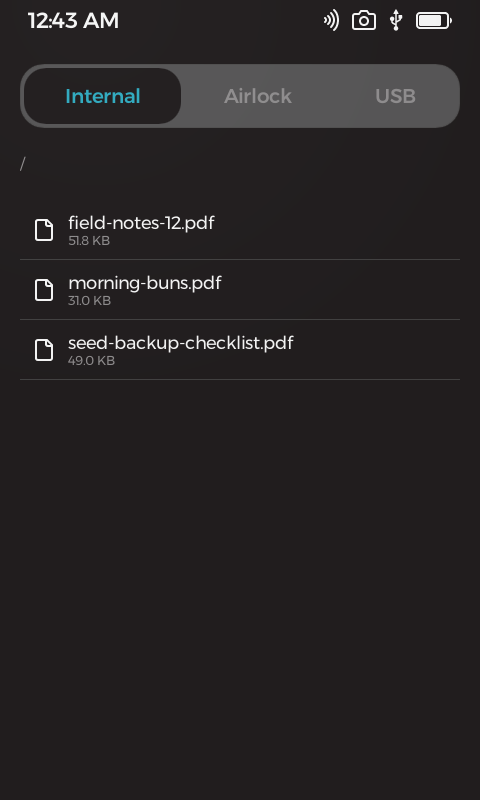

On-device file browser
Overview
PDF Viewer opens PDFs directly on Passport and pages through them rendered on the device itself. It browses Passport Internal, Airlock, and USB storage, filtering the listing down to folders and PDFs, and opens any file with a tap. Pages render fit-to-width, with previous and next buttons and drag-panning for tall pages.
The app is strictly read-only. Its signed permission manifest contains no write grants, so it can view files but cannot modify, create, or delete anything. Passport has no network stack, so documents never leave the device, and a corrupt or mislabeled PDF shows a clear error banner while the app keeps running.
What it does
- Browses Internal, Airlock, and USB storage with folder navigation.
- File list shows only folders and PDFs.
- Fit-to-width page rendering, all on-device.
- Previous and next paging plus drag-panning for tall pages.
- Strictly read-only: signed manifest carries no write grants.
- Offline by design, no cloud and no companion app.
- Corrupt or mislabeled files surface a clear error banner without crashing.
Technical breakdown
How the app is built, for developers evaluating the platform.
Read-only by manifest
The app signed permission manifest contains no write grants at all, so it cannot modify, create, or delete files. Access is limited to viewing.
On-device rendering
Every page is rendered directly on Passport, fit-to-width, with previous and next buttons and drag-panning for tall pages. No companion app is involved.
Offline by design
Passport has no network stack, so opened documents never leave the device. There is no cloud dependency.
Dig into the source
README, architecture notes, and the wire protocol live in the repo.