

Calculator
A full calculator, native on KeyOS
A basic-and-scientific calculator that runs natively on Passport, showing KeyOS as a general-purpose app platform rather than a Bitcoin-only signer.
Last updated Sep 2026
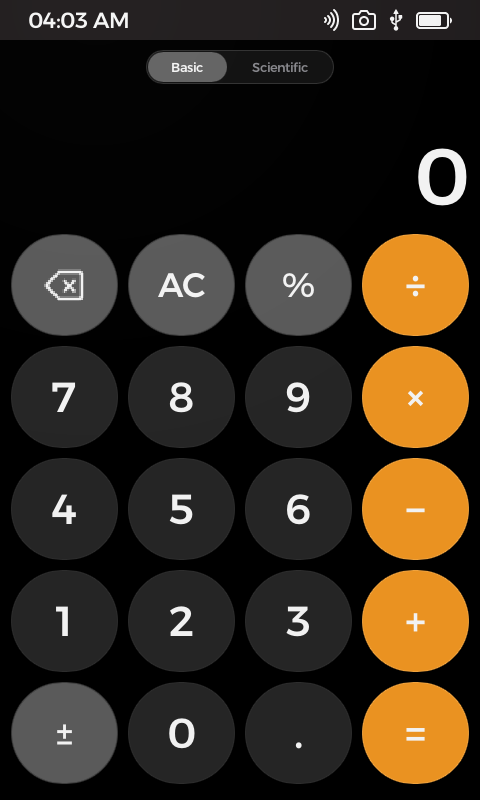
Basic keypad · dark
Overview
A calculator app written from scratch for Passport. It has two modes: a basic keypad, and a scientific mode with trigonometry, hyperbolic functions, powers and roots, logarithms, factorial, constants, a random generator, a 2nd-function shift, radian and degree switching, and a four-key memory. A running formula sits above the answer, and the whole interface tracks the system light and dark theme.
It exists to make a simple point for developers: Passport is a general-purpose computer, not only a signing device. There is no Bitcoin, no networking, and no secret material here, just a native Rust and Slint application built with the public Foundation SDK, driven end to end through the foundation CLI and the KeyOS simulator.
What it does
- Basic mode: digits, decimal, sign flip, percent, backspace, an AC / C clear that adapts to context, and the four operators.
- Scientific mode: sin/cos/tan, sinh/cosh/tanh, x², x³, xʸ, eˣ, 10ˣ, 1/x, √, ³√, ʸ√, ln, log, x!, π, e, EE, and a random generator.
- 2nd-function shift exposes inverse trig and related alternates; a Rad / Deg toggle sets the angle unit for every trig call.
- Four-key memory (mc, m+, m−, mr) plus parenthesis support for grouped expressions.
- A live formula line renders above the large answer, so you see the whole expression as you build it, then the result on equals.
- Light and dark palettes follow the KeyOS system theme automatically; the custom key colours are defined once and recolour on the fly.
- Per-keypress performance is logged (calc, sync, and total microseconds) to keep the UI responsive on device.
Technical breakdown
How the app is built, for developers evaluating the platform.
The expression engine
src/calculator.rs holds the whole calculator with no external math dependencies. Input is modelled as a stream of typed pieces (PieceKind: number, decimal, exponent, operator, parenthesis, function, constant, postfix), which is both rendered as the on-screen formula and evaluated on equals. It carries answer state, a just-evaluated flag for chaining, memory, and a small deterministic random generator, so behaviour is fully host-testable off-device.
UI in Slint
ui/app.slint composes the interface from a couple of reusable components (a rounded CalcButton and an icon variant for backspace) laid out over basic and scientific keypads and a mode toggle. A CalcPalette global defines every key colour for light and dark in one place; the orange operator keys, muted function keys, and adaptive text all read from it. The backspace glyph is a single SVG recoloured at runtime via Slint colorize, so it inverts cleanly between themes.
Theming and platform
main.rs boots through the SDK app_minimal! macro and wires a single Callbacks.input(string) channel from every key back into the Rust model, then syncs only the properties that changed. Theming uses foundation-themes: include_theme! pulls in the compiled app theme and apply_theme! pushes the palette into the Slint Theme global, with a subscription that re-applies whenever the system switches between light and dark.
Dig into the source
README, architecture notes, and the wire protocol live in the repo.